Step-by-Step Guide: From Script to Final Motion Graphics Video in the AI Age
A client once told us, “I have the perfect script, but I don’t have the three weeks or the five-figure budget required to animate it.” In the past, that was a dealbreaker, but in 2026, the “Motion Graphics Video in the AI Age” has turned that obstacle into a massive opportunity. We showed them how to bridge the gap between a written idea and a high-fidelity moving story using a workflow that values speed without sacrificing the “soul” of the brand.
What people don’t realize is that AI has shifted the role of the creator from a manual laborer to a high-level director. In this article related to motion graphics videos, we provide a detailed roadmap to help you navigate this new creative frontier, ensuring your next project moves faster, costs less, and looks spectacular.
Why Use AI for Script To Motion Graphic Video?
If you are manually stitching together every keyframe, you are working on an old clock that will not allow your brand to thrive. AI is not so much about mere automation as about freeing your creativity, usually rooted in the mechanical, tedious nature of repetitive work. This transition lets you handle elevated-level storytelling, with the technology handling the complex technical implementation. This new architecture for AI motion graphic videos will enable designers to generate high quality video imagery that formerly required months of manual effort.
- Speed– Create videos in minutes instead of days or weeks, allowing your brand to respond to market trends while they are still relevant.
- Cost-effectiveness– No need for expensive animation teams or software licenses that eat into your marketing ROI every single month.
- Accessibility– Anyone can create professional-looking animations regardless of technical skills, lowering the barrier to entry for small businesses.
- Consistency– Maintain a uniform style across all your content by using AI “seed” settings that keep colors and characters stable.
- Flexibility– Easily make changes and iterations without starting from scratch, meaning a “revision” takes seconds rather than a full workday.
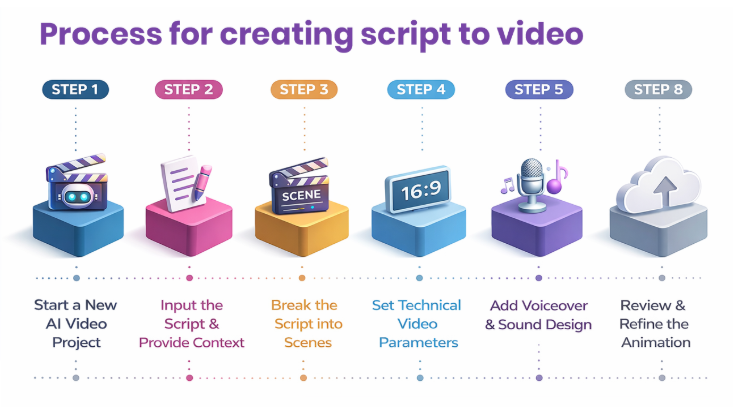
Step by Step Workflow- Turning a Script into a Motion Graphics Video with AI
Mastering AI generated motion graphics requires much more than just clicking a button. It must have a statistically rigorous, systematic method to ensure the end product is of high quality and branded. A correct workflow is necessary since it helps avoid the impression of the AI generated look, as it makes every automated process seem disconnected and generic without basing it on strategic human control. This Motion Graphics Video guide in AI is the key you will use to put your vision for a piece of artwork into the machine and make it work logically, as each scene flows from the previous one. Through a systematic process, you can have full control of the narrative and the visual consistency as well as make the most out of the record-breaking speed that is provided by modern technology.
Case Study- Rapid Branding for a Tech Startup
Zomato (food delivery company) needed a 30-second explainer video for a sudden video creation to dedicate to their food delivery partner just before Holi festival in India in just 48 hours. Using this exact workflow to create AI motion graphic videos, our team at Visual Best skipped the traditional 2-week storyboard phase. By utilizing AI-Powered Graphics for the initial scene generation and having our senior designers refine the character consistency in Step 7, we delivered a high-conversion video in 24 hours. The result? A 40% increase in sign-ups during the launch weekend at a fraction of the traditional production cost.
Top AI Tools for Creating Motion Graphics Videos from Script
Some AI platforms now allow creators to generate entire animated videos from script writing to scene animation and voiceover in a single workflow. These tools are the heavy hitters of 2026.
- Runway – Best for high-end cinematic AI video generation. Generates high quality motion graphics and video scenes from text prompts with advanced editing and real-time iteration capabilities.
- InVideo AI – Ideal for quick marketing content and social media videos. A popular AI video generator that can create scripts, visuals, and subtitles automatically from a simple prompt or idea.
- Kling 3.0 – Advanced realism and motion consistency for cinematic storytelling. Creates real cinematic AI motion videos from scripts with realistic motion, consistent visuals, and built-in audio generation for a “full package” feel.
- Suno AI – Best for AI-generated music, voiceovers, and sound design. Produces AI generated voiceovers, music, and sound effects that enhance motion graphics videos and complete the final output with professional audio.
- Powtoon AI Animation Generator – Best for explainer videos and business presentations. Converts scripts into scene based animated videos with editable visuals and transitions, making it suitable for explainers and marketing content.
- Mootion AI – Ideal for automated storytelling with characters and dialogue. Transforms scripts into full animated stories with characters, scene transitions, and dialogue-based animation automatically generated from text.
- Krikey AI Animation Maker – Best for character animation and interactive storytelling. Enables step-by-step AI motion videos with customizable characters, automated rigging, and lip-synced dialogue for animated storytelling videos.
- MagicLight AI – Best for multi-scene storytelling with consistent visual style. Generates multi-scene animated videos from a script while keeping characters and visual styles consistent throughout the entire story arc.
- Wavel AI – Ideal for avatar-based videos and personalized branding content. Converts scripts into avatar-based animated videos with voiceovers, captions, and customizable animation styles for a personal brand touch.
Research from SNS Insider’s AI Video Market Analysis indicates that the market for these tools is growing at a CAGR of 19.5%, as brands move away from traditional static images and toward dynamic, AI driven motion.
Common Challenges and Solutions in AI Motion Graphics Creation
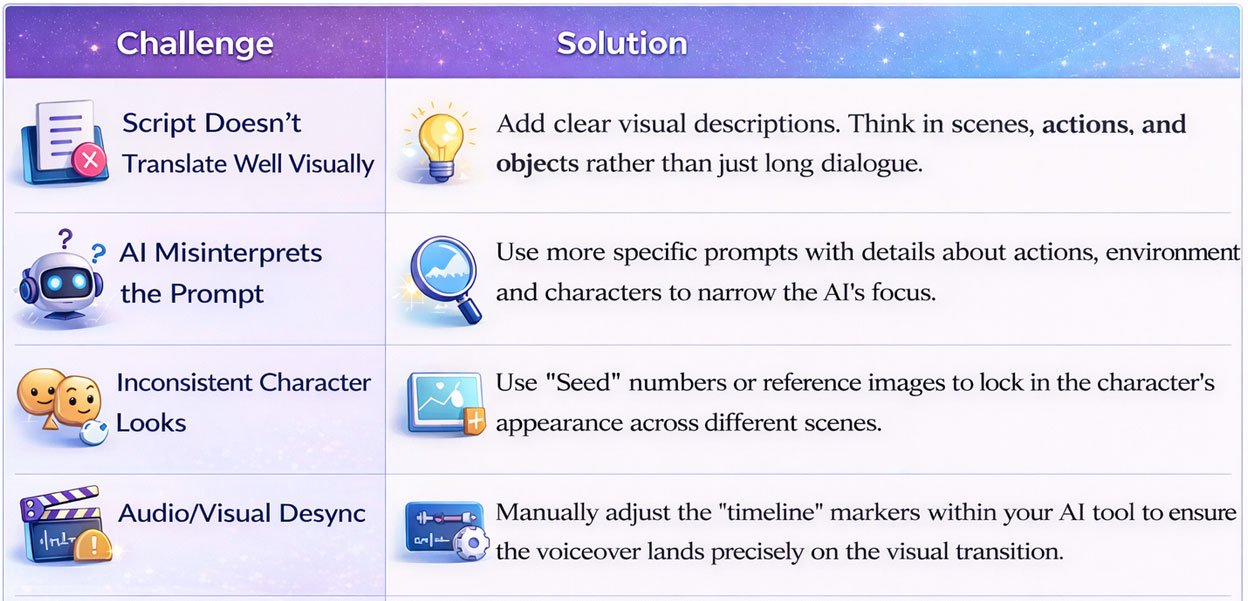
While Motion Graphics Video in the AI Age offers incredible speed, the process is not always perfect. There are significant challenges in AI for motion graphics. Such as visual misinterpretations or technical glitches that can disrupt your narrative. To overcome these hurdles, you must consider solutions like detailed prompt engineering and manual timeline adjustments to keep the final output professional. By staying proactive and refining your approach, you can turn these obstacles into opportunities for even better results. Suggest you look for the table below to quickly troubleshoot the most common issues in your AI video workflow.
Advanced Tips for Script to Motion Graphics Video AI Mastery
Optimizing for Different Platforms
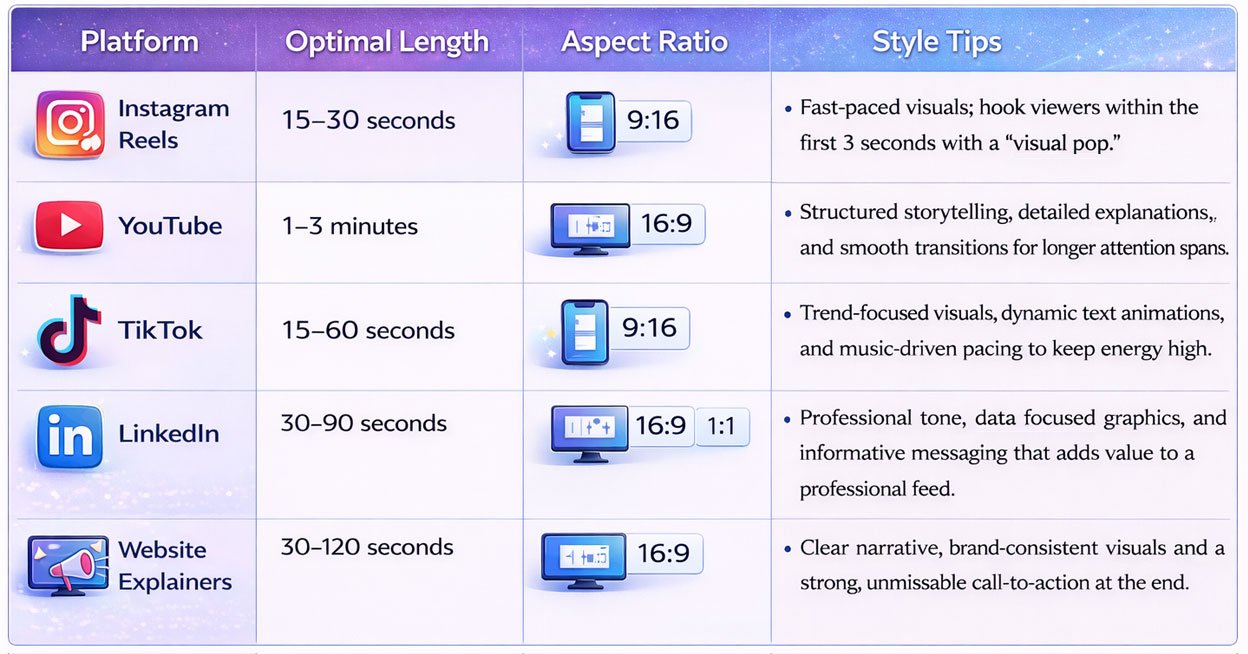
The viewing patterns and technical specifications are also distinct per platform in 2026 and will determine the performance of your content. Motion video AI can be designed to meet the preferences of specific algorithms, which will go a long way toward ensuring your engagement and viewer retention. To illustrate, whereas TikTok users are fond of high energy 15 to 30-second vertical videos, LinkedIn viewers are now more responsive to 90-second professional tips. High retention strategies also need “silent optimization” with AI generated captions and visual indications so that even with the hearing disabled on, your message will get through. With aspect ratios and pacing adjusted to suit every digital platform, you convert a best-fit video into an experience that is native to that platform, and one that the viewer is unlikely to skip.
The Future of AI Motion Graphic Video From Script
As we look toward the end of 2026 and beyond, the line between “scripting” and “final product” will blur even further. We are entering an era of Real Time Generative Animation, where videos can be updated instantly based on live data or user preferences. Imagine a motion graphics video that changes its colors based on the viewer’s time of day or swaps its product featured based on their browsing history.
AI is also becoming more “spatial.” We will soon see script-to-AR (Augmented Reality) workflows where your motion graphics aren’t just on a screen, but floating in the viewer’s physical space. The future belongs to those who view AI as a creative partner that handles the “how” while they focus on the “why.”
Statistics from Statista’s AI Technology Forecast suggest that by 2027, over 60% of all marketing videos will have at least one AI-generated component, making this the most critical skill set for modern creators to master.
Elevate Your Brand: Why Human Expertise and AI Precision Meet at Visual Best!
At Visual Best we don’t just follow the trends; we set the standard for how Motion Graphics Video in the AI Age should look and perform. We understand that while anyone can prompt an AI tool, it takes a team of seasoned designers to ensure the output aligns with your high level brand strategy. We use these advanced AI workflows as a force multiplier to deliver cinematic high impact videos at a speed that traditional agencies simply cannot match.
We use our Human in the Loop model to ensure that all AI-generated frames are reviewed by a professional designer, who refines each to perfection. We strike a balance between fast content and effective branding, presenting you with the best of both worlds. Need it to be a 30-second social advertisement or a 2-minute corporate explainer. We have the experience to turn your script into a masterpiece.
Willing to learn how AI can accelerate your motion graphics or branding project? Talk to our team at Visual Best, and let’s build something great together.